Do you think MFA protects your team/organization from phishing? Guess it is time to think again. Let’s explore how attackers abuse legitimate OAuth device codes to steal tokens and hijack accounts.
Short Backstory
A few years ago, when my journey into cybersecurity was just taking off, I read Nestori Syynimaa’s post on device code phishing, spun it up in a lab to watch it work, and figured out that it leveraged a clever edge case to make the attack possible. At the time, I simply moved the content I’d read into my archive, updated my knowledge base, and ultimately moved on to expand my knowledge with other things.
Fast forward to February 2025: Microsoft published its Storm-2372 writeup, and the thing I had archived a few years ago as a niche attack path was suddenly on the front page of every feed I read. The same primitive I had tested in a lab, the OAuth 2.0 device authorization grant, had become the preferred account-takeover method for threat actors working through government, defense, NGOs, telecoms, healthcare, and energy across the world. When I went back to refresh the information I had archived a couple of years earlier, the problem and the attack itself had barely changed.
Present Time
Between my lab test and the technique Storm-2372 capitalized on, almost nothing about the core technique had changed. It still works the way Syynimaa described it in 2020, because there is nothing we can really do to fix the flow.
The issue is tricky to fix because device code flow exists for input-constrained devices, such as smart TVs, conference room hardware, CLI tools, anything where typing a password into a browser is awkward. The device asks the identity provider for a code, shows you a short user_code and a URL (microsoft.com/devicelogin), and you finish the login on your phone or laptop. The device polls in the background and collects its tokens once you’re done, just as described in RFC 8628.
General OAuth flow, taken directly from Syynimaa’s blog
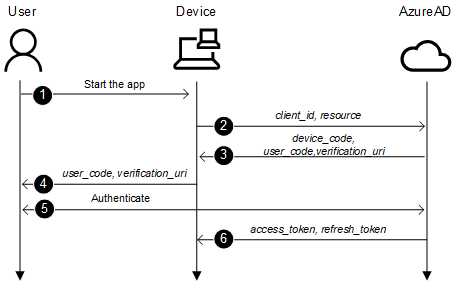
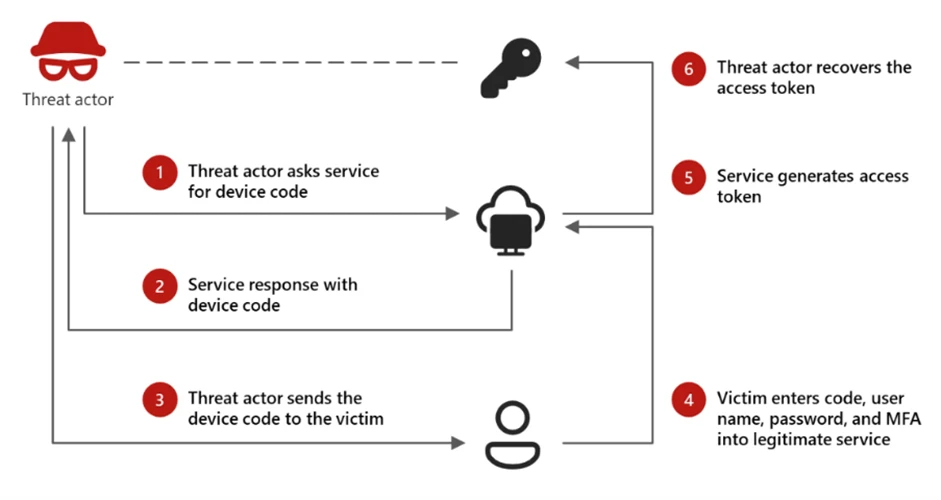
The phish inverts who owns the device. The attacker requests the code from their own infrastructure, then sends you the user_code with a reason to type it in, e.g. a Teams meeting to join, a document to open, an “IT verification step,” and so on. You authenticate on the genuine Microsoft page, with your real password and your MFA, and enter the code.
Once authenticated, the tokens land in the attacker’s console, while everything happened right under your nose, with no fake login page, no lookalike domain, no reverse proxy, nothing for domain reputation to flag, and nothing to suggest the domain was spoofed, because every interaction happened on Microsoft’s own infrastructure, and the MFA (if prompted) was satisfied legitimately.
The issue existed long ago and may well have been in use back then; it’s just that the rest of the phishing ecosystem got hard enough that this became the path of least resistance.
The technique moved underneath
Phishing tradecraft against Microsoft 365 has gone through three layers, with each one a response to detection pressure on the last.
The very first and most common layer was credential harvesting, a fake login page that captures username and password. MFA broke this outright and password without a way to bypass MFA is close to worthless against a tenant with even basic Conditional Access.
The second layer was the adversary-in-the-middle attack, where tools like Evilginx reverse-proxy the real Microsoft login through an attacker-controlled host, relay the MFA prompt, and steal the resulting session cookie. This defeats most MFA implementations, and we still see such attacks targeting our users. But AiTM has a cost: it needs attacker web infrastructure sitting on a lookalike domain, proxying traffic in real time. That surface is fingerprintable (e.g. the victim might be on microsoft-online.com rather than login.microsoftonline.com), and it’s exactly what domain monitoring, browser warnings, and token-binding controls are built to catch.
Now comes device code phishing, which can be considered the third layer, and its innovation is deleting the attacker’s web surface almost entirely. There is no proxy and no spoofed page, because the victim authenticates on the real thing. The attacker’s only infrastructure is whatever sends the message and whatever polls the token endpoint, neither of which touches the login.
Interestingly, phishing-resistant MFA doesn’t save you the way you’d hope, because the victim completes a real, valid login and the credentials never leave Microsoft’s surface. The whole attack lives in the gap between the person typing the code and the device receiving the token being the same, trusting party.
And within the technique, the tradecraft has its own quiet shift, evolving to leverage wider features. Earlier campaigns grabbed an access token for one resource (e.g. Microsoft Office), pointed it at Graph, read mail, and moved on. This was particularly easy because it needed no app secret, since the clients are public. Storm-2372’s campaign went further.
Example of Storm-2372 using the Microsoft Authentication Broker client ID in their phishing campaign
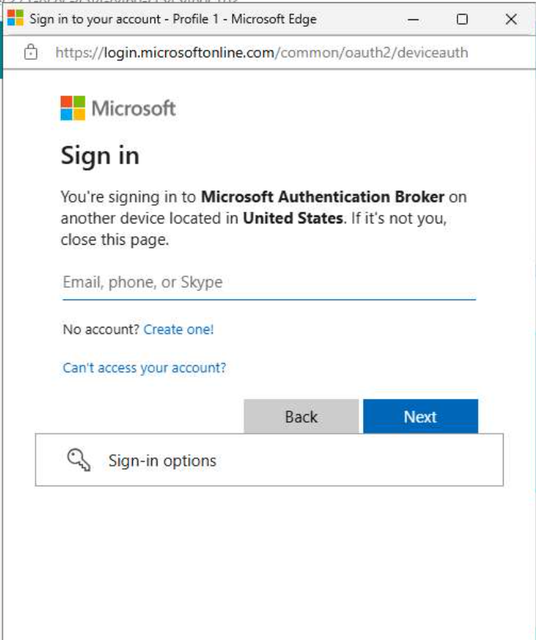
On 14 February 2025, in a blog published by Microsoft, they observed the actor switching to the Microsoft Authentication Broker client ID (29d9ed98-a469-4536-ade2-f981bc1d605e), using the refresh token to request a token for the Device Registration Service, registering an attacker-controlled device into Entra ID, and pulling a Primary Refresh Token off it. A PRT is durable, broad, and looks like a managed device’s. That is a clever way to get a foothold on the account that survives a password reset and can do far more than read one mailbox.
 |
|---|
| Device Code Phishing Attack Chain |
Same primitive Syynimaa demonstrated in 2020, but the tradecraft has evolved. Threat actors simply learned to trade a single, limited access token for persistent device identity. Email security company Proofpoint has since tracked multiple state-aligned crews leveraging the same technique, and a Cloud Security Alliance note from March 2026 put the count at 340+ M365 organizations, showing the niche edge case becoming a standard play in the wild.
Catching It
Coming back to this issue, one of the main reasons I drafted this blog was to build detection around the device code phishing technique.
The thing that surprised me first while writing detections was that the interactive sign-in is logged from the attacker’s IP, because the attacker’s device is what’s polling and receiving the token. Lina Lau (inversecos) made this point years ago, and it still holds true: the sign-in record carries the location of whoever completed the device side, not whoever typed the code. So a device code sign-in from a country the user has never logged in from is a strong signal. The catch, also from her, is that advanced threat actors proxy to match the victim’s geography precisely because they know this, so geo-mismatch is a great net but not a guarantee, whereas impossible-travel / out-of-country login detection might come in handy in some cases.
The reliable structural signal is the authentication protocol Device Code itself, since device code flow is rare in most tenants. If your users aren’t logging conference-room hardware in by hand, almost every device code sign-in is either a misconfigured app or someone being phished. That’s a good indicator to consider while writing the detection rule.
The response side is the boring part, and it’s the same playbook you’d run for any token theft or compromised account: revoke the refresh tokens, reset the password, force re-auth, and, most importantly, check whether a device got registered in the window, because a Primary Refresh Token (PRT) pivot means revoking sessions alone won’t evict them. The same playbook you’ve been following for compromised accounts, impossible travel, and stolen-cookie cases applies cleanly here.
Passing onto the Next Person
| Practical notes if you’re drafting detection and prevention for this:
-
Block the flow if you don’t need it: Conditional Access now has an Authentication Flows condition that explicitly targets device code flow. Microsoft itself recommends blocking it if it’s unnecessary.
-
Roll the block out in report-only first: run the Authentication Flows Conditional Access policy in report-only for a week, and see how it’s being used in your organization.
-
Blocking the flow does not kill tokens already issued: a refresh token minted before you turn on the policy keeps working until it expires, so manually revoke existing sessions for anyone who has used device code or whom you’re suspicious about.
-
Alert on device code sign-ins directly, not just on geo anomalies: layer geo/IP anomaly on top of the authentication protocol, while staying skeptical, since APTs proxy to the victim’s location to avoid detection.
-
Watch the device registration pivot specifically: monitor for the pattern where device code flow, the Microsoft Authentication Broker, and the Device Registration Service are used together.
-
Educate users about the technique: bring the issue to your users and advise them never to enter a device code they did not personally start. Almost no legitimate workflow sends you a code to type into a Microsoft page.
-
The codes are short-lived, so the good kits make them dynamic: a device code typically expires in about 15 minutes, so rather than risk the victim hitting an expired one, modern phishing pages don’t hand out a static code. They request a fresh device code on the server side every time the page is loaded and render a valid one on each render. The code you see is regenerated on every visit, so it’s always inside its validity window.
Coordinated Disclosure
Microsoft stated plainly in the Storm-2372 writeup that there is no vulnerability in their code, and that the tokens involved are industry standard. The device authorization grant is doing precisely what RFC 8628 specifies. The weakness is structural and human (as in most phishing campaigns). The protocol was designed under the assumption that the person typing the code and the device collecting the token are the same cooperating party. Phishing violates that assumption without violating the protocol. You can’t patch your way out of a design that is working correctly; instead, you scope the flow off where you don’t need it, and you teach people one rule. That’s an awkward, uncomfortable category of problem for anyone who likes a clean fix, and it’s exactly why this technique has aged so well.
Detection and Prevention
| KQL detection query under construction.
The prevention control, a Conditional Access policy to block device code flow, would be:
- Entra admin center -> Protection -> Conditional Access -> New Policy
- Users: all users, excluding your break-glass accounts
- Target resources: All resources
- Conditions -> Authentication Flows: set Configure to Yes, select Device code flow
- Grant: Block access
- Start in Report-only, monitor for a week, then enable
If your conference-room hardware genuinely needs it, scope an exception narrowly while blocking it everywhere else, allowing only the specific devices in the specific location that can’t live without it. By default, though, it should be turned off, as Microsoft recommends.
References
More on device code by Microsoft https://www.microsoft.com/en-us/security/blog/2026/04/06/ai-enabled-device-code-phishing-campaign-april-2026/
More on blocking authentication flow https://learn.microsoft.com/en-us/entra/identity/conditional-access/policy-block-authentication-flows
Proofpoint blog on phishing https://www.proofpoint.com/us/blog/threat-insight/device-code-phishing-evolution-identity-takeover
Microsoft blog on device code phishing (Storm-2372) https://www.microsoft.com/en-us/security/blog/2025/02/13/storm-2372-conducts-device-code-phishing-campaign/
Syynimaa’s blog on the same topic https://aadinternals.com/post/phishing/